
Cricut Joy and Joy Xtra: Simplified Blade System
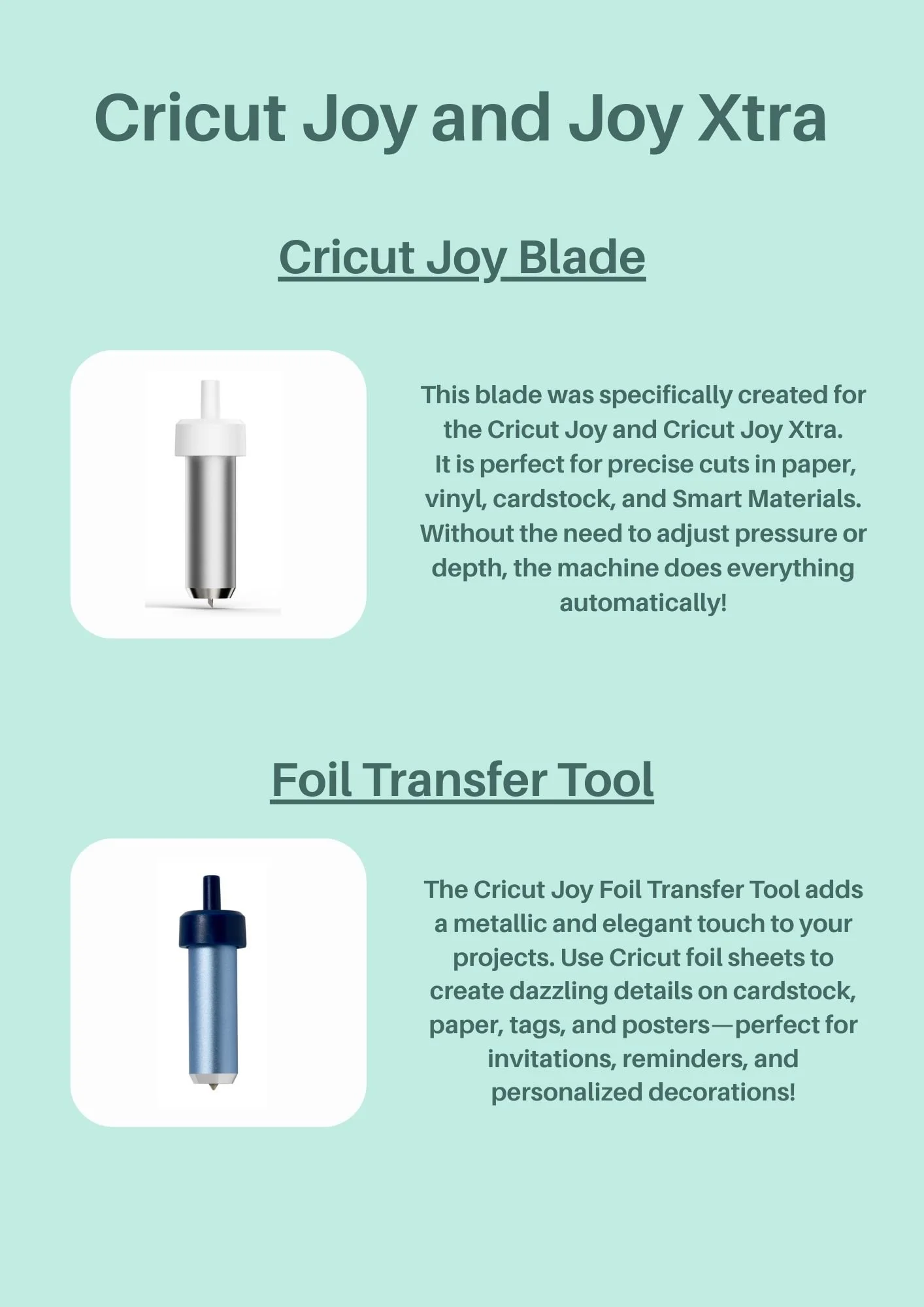
The Cricut Joy and Cricut Joy Xtra are designed with simplicity and convenience in mind, making them perfect for quick and easy projects. Unlike some of the larger Cricut machines, the Joy series features a streamlined selection of blades and tools. The primary blade for these machines is the Cricut Joy Blade, which is specifically engineered to handle a variety of materials, including paper, vinyl, cardstock, and Smart Materials. This blade ensures precise cuts without the need for manual adjustments, as the machine automatically calibrates pressure and depth for optimal results.
Cricut Joy Blade: Versatility and Ease of Use
The Cricut Joy Blade is the go-to tool for most projects on the Joy and Joy Xtra machines. It is designed to deliver clean and precise cuts across a range of materials, making it ideal for creating custom stickers, labels, cards, and more. One of the standout features of this blade is its automatic adjustment capability, which eliminates the need for users to manually tweak settings. This makes the Joy series particularly user-friendly, especially for beginners or those looking for a hassle-free crafting experience.
Foil Transfer Tool: Adding Elegance to Projects
In addition to the Cricut Joy Blade, the Foil Transfer Tool is another unique tool available for the Joy and Joy Xtra machines. This tool allows users to add metallic foil accents to their projects, creating stunning and elegant designs on cardstock, paper, tags, and posters. It's perfect for personalizing invitations, reminders, and decorations, giving projects a professional and polished look. The Foil Transfer Tool works with Cricut foil sheets, making it easy to add a touch of sparkle and sophistication to any creation. Together, these two tools provide a versatile yet simple toolkit for a wide range of crafting possibilities.
Blades and Tools for Cricut Explore Machines
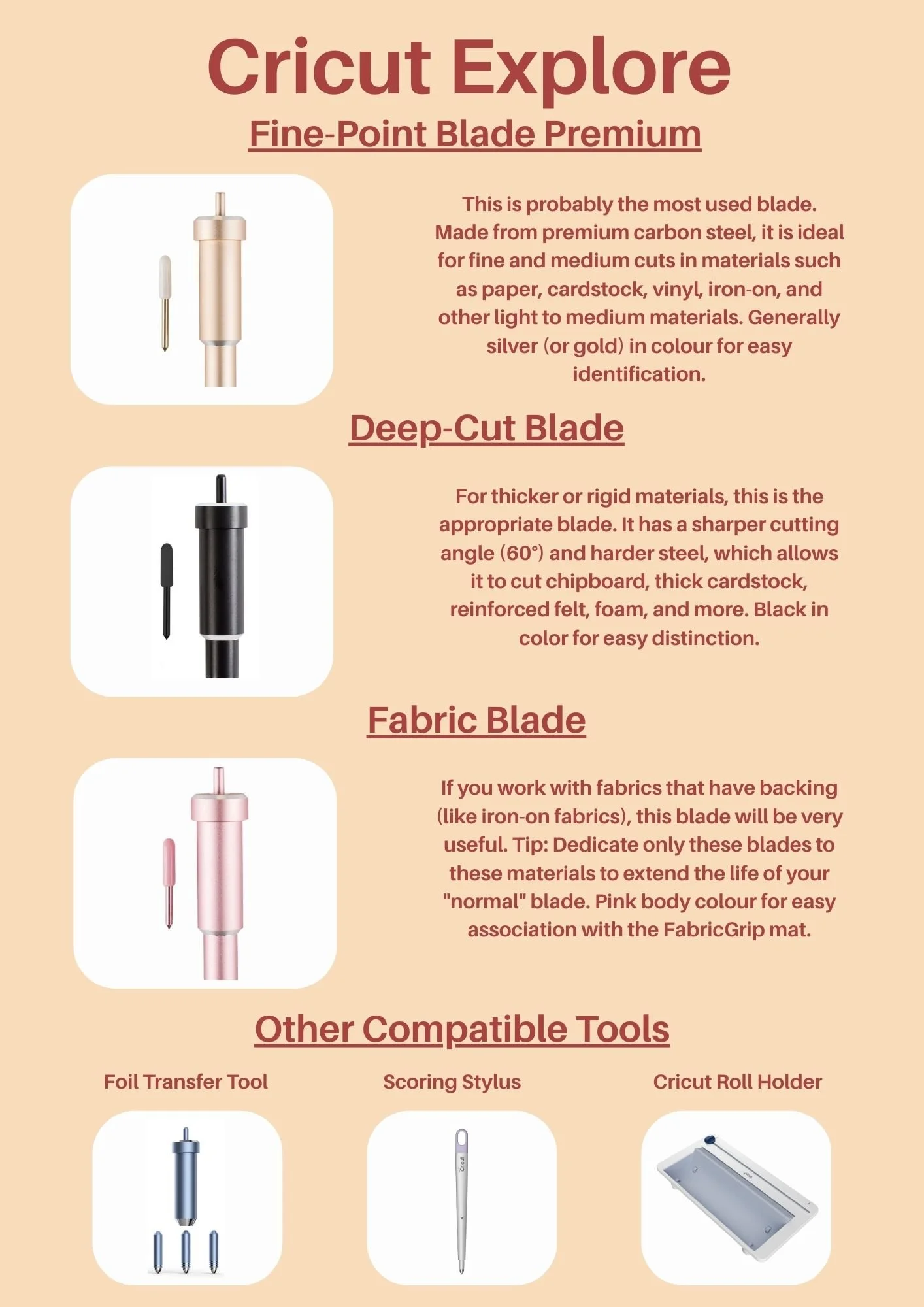
The Cricut Explore series, including the Explore 3, is designed to be versatile and user-friendly, offering a range of blades and tools to cater to various crafting needs. Among the primary blades are the Fine-Point Blade Premium and the Deep-Cut Blade. The Fine-Point Blade Premium, made from premium carbon steel, is ideal for fine and medium cuts in materials like paper, cardstock, vinyl, and iron-on. Its durability and precision make it a staple for most projects. The Deep-Cut Blade, on the other hand, is designed for thicker and more rigid materials like chipboard, thick cardstock, and foam, thanks to its sharper 60-degree angle and harder steel.
Fabric Blade for Specialized Projects
Another essential tool for the Cricut Explore machines is the Fabric Blade. This blade is specifically designed for cutting fabrics, especially those with backing, such as iron-on fabrics. It ensures clean and precise cuts, making it perfect for projects involving custom apparel, quilting, or fabric-based decorations. To prolong the life of your Fabric Blade, it's recommended to dedicate it solely to fabric projects. The Fabric Blade's pink body makes it easy to identify and associate with the FabricGrip mat, ensuring you always use the right tool for the job.
Additional Compatible Tools
Beyond blades, the Cricut Explore machines are compatible with several other tools that enhance their functionality. The Foil Transfer Tool allows you to add elegant metallic accents to your projects, perfect for creating eye-catching details on invitations, cards, and decorations. The Cricut Scoring Stylus is a specialized tool designed to create crisp, clean fold lines on various materials. This tool is particularly useful for projects that require neat and professional-looking folds, such as greeting cards, 3D paper crafts, gift boxes, and envelopes. Lastly, the Roll Holder helps manage and organize your materials, making it easier to work with rolls of vinyl or other materials. These tools, along with the blades, are also compatible with the Cricut Maker machines, offering even more versatility and creative possibilities.
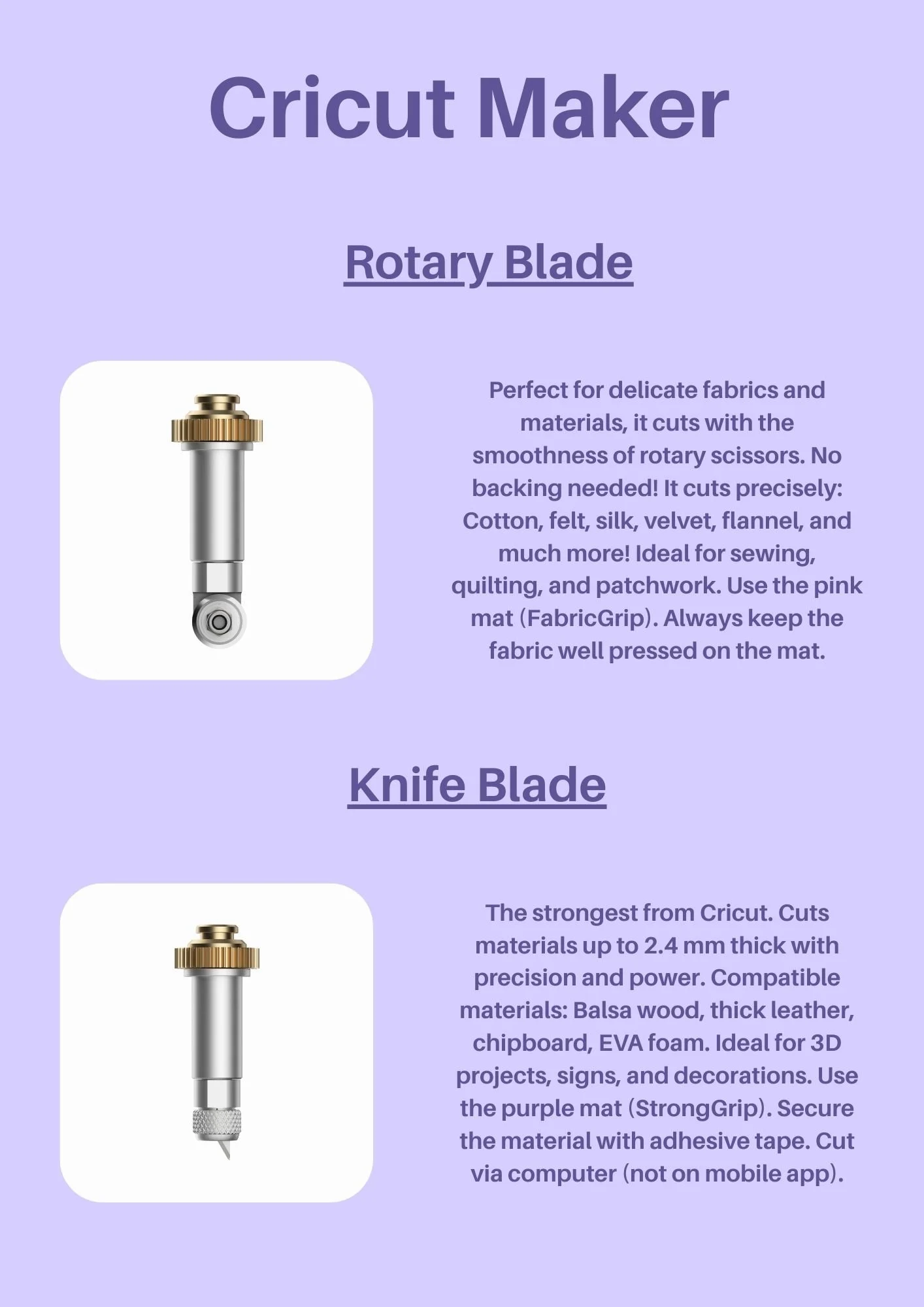
Cricut Maker Blades: Rotary Blade and Knife Blade
The Cricut Maker offers a versatile range of blades designed to handle a wide variety of materials and projects. Among these, the Rotary Blade stands out for its precision and smooth cutting action. Perfect for delicate fabrics and materials, the Rotary Blade cuts with the smoothness of rotary scissors, making it ideal for sewing, quilting, and patchwork projects. It eliminates the need for backing, allowing you to cut materials like cotton, felt, silk, velvet, and flannel with ease. To achieve the best results, always use the pink FabricGrip mat and ensure the fabric is well pressed on the mat.
The Knife Blade is another powerful tool in the Cricut Maker's arsenal, known as the strongest blade from Cricut. It is designed to cut through thick materials up to 2.4 mm with precision and power. This makes it perfect for projects involving balsa wood, thick leather, chipboard, and EVA foam. The Knife Blade is ideal for creating 3D projects, signs, and decorations. For optimal performance, use the purple StrongGrip mat and secure the material with adhesive tape. It's important to note that the Knife Blade operates via the computer and is not compatible with the mobile app.
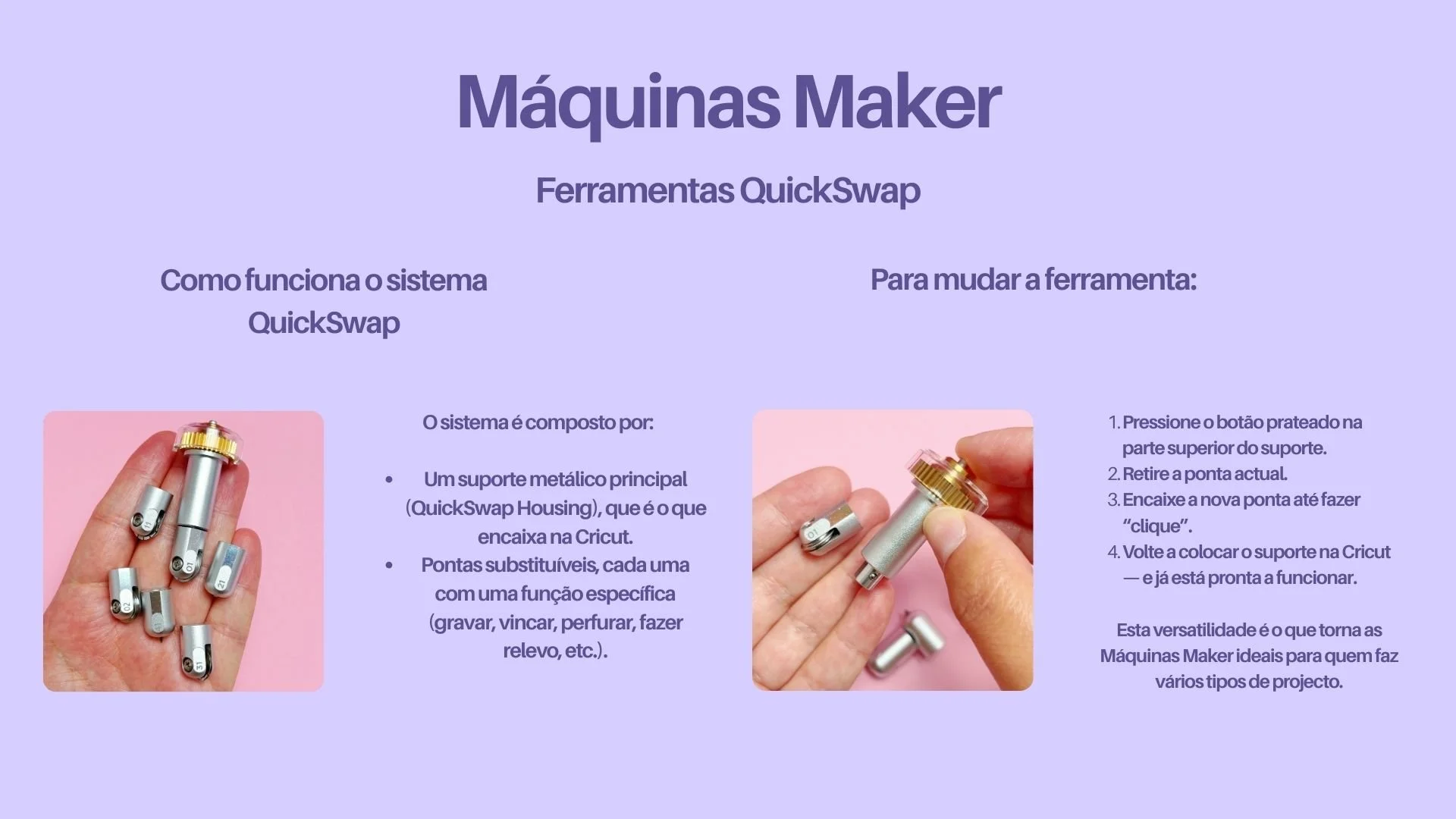
QuickSwap Blades: Versatility and Convenience
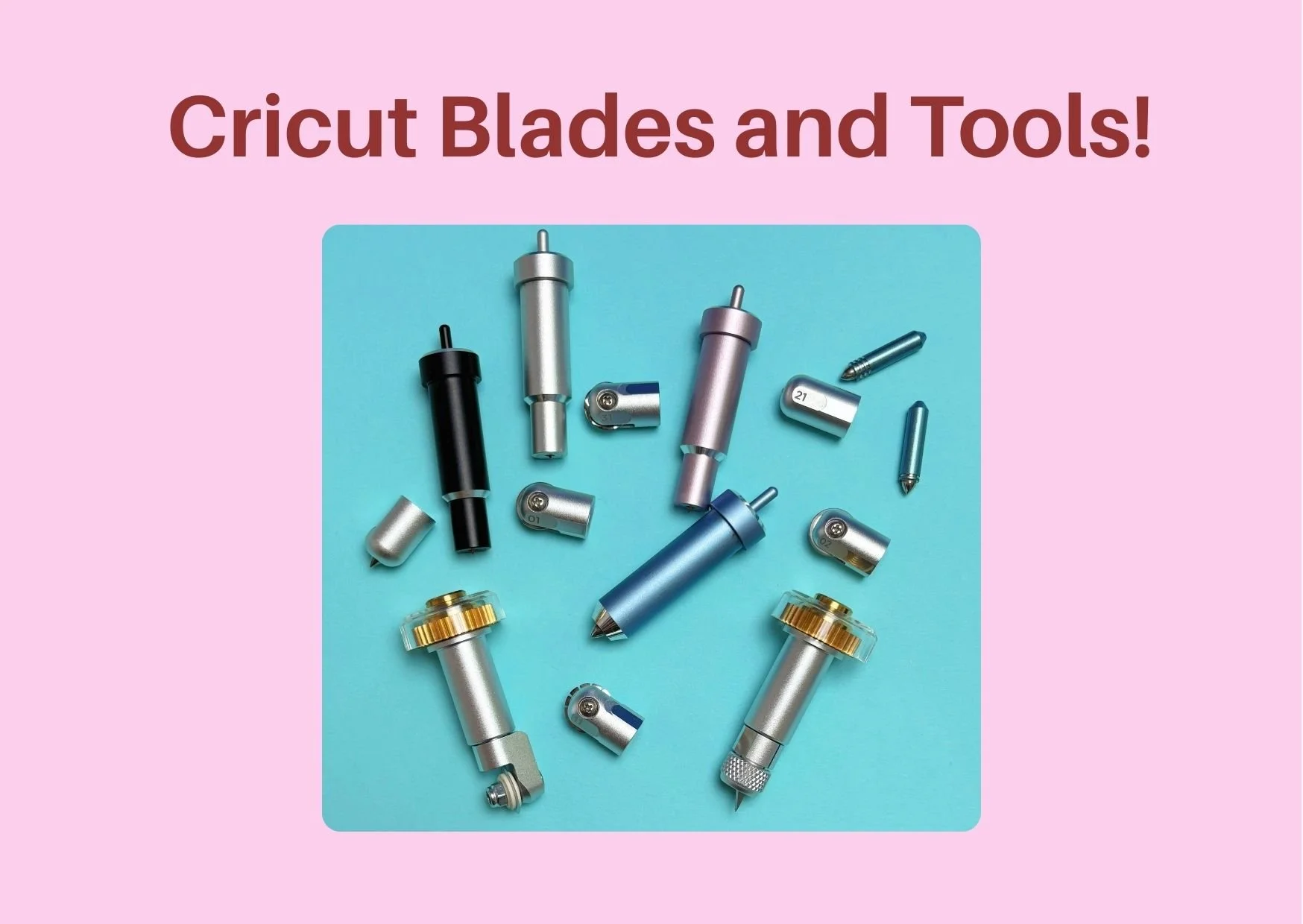
The QuickSwap system is a game-changer for Cricut Maker users, offering a range of interchangeable tips that can be easily swapped out for different functions. This system includes various tips such as the Engraving Tip, Perforation Blade, Scoring Wheel Tip, Debossing Tip, and Wavy Cut Tip. Each tip is designed for specific tasks, such as engraving patterns on acrylic or metal, creating perforated lines for easy tearing, or scoring paper for crisp folds. The QuickSwap system's versatility allows crafters to tackle a wide range of projects with ease, from personalized tags and invitations to intricate 3D designs and decorations. The ease of changing tips makes the Cricut Maker an incredibly flexible tool for all kinds of creative endeavors.
Let’s dive into the details of each blade, highlighting their unique features and applications.
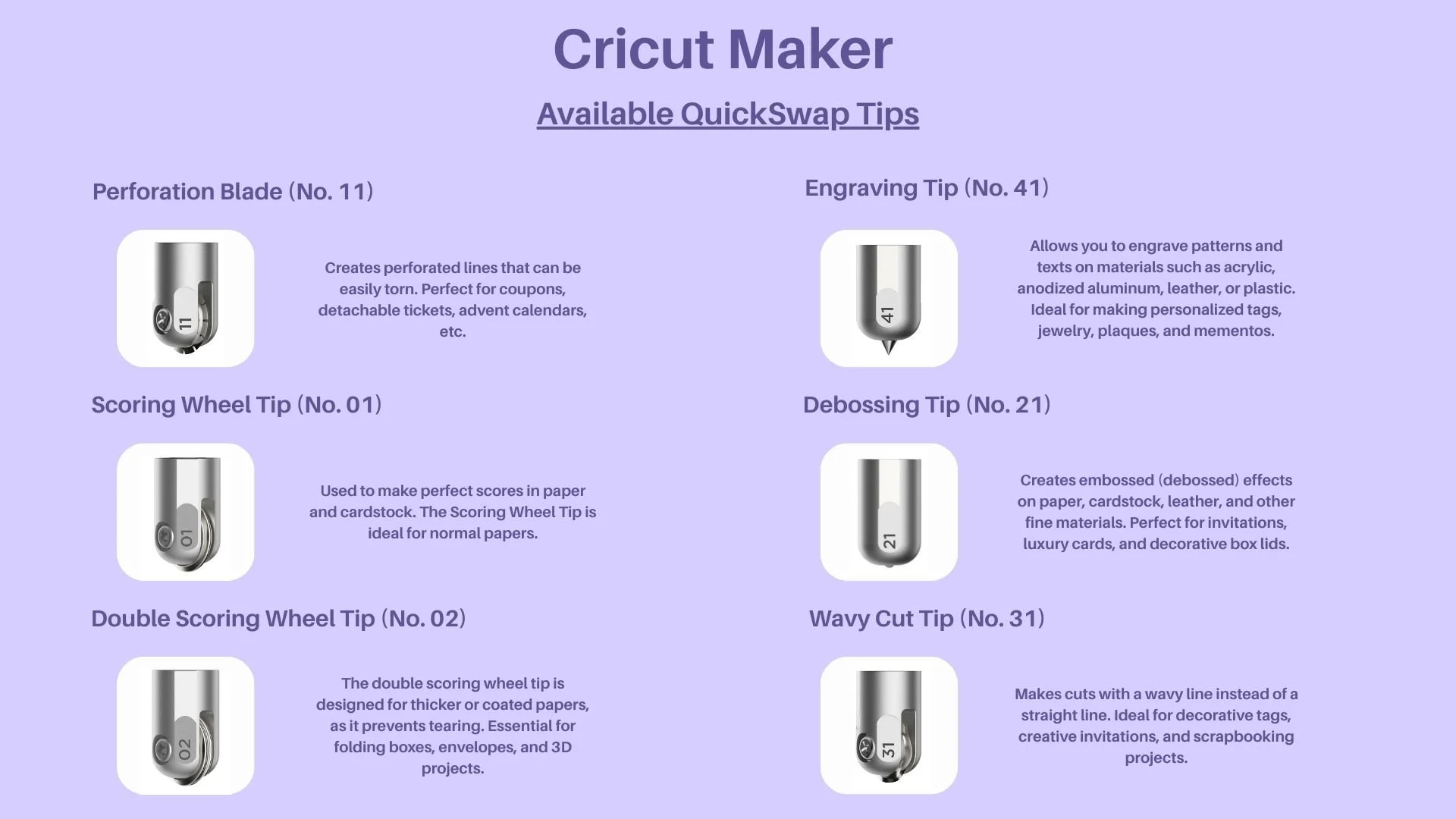
Perforation Blade (No. 11)
The Perforation Blade (No. 11) is a versatile tool designed to create perforated lines that can be easily torn. This makes it ideal for projects that require detachable elements, such as coupons, detachable tickets, and advent calendars. The precision of the Perforation Blade ensures clean and functional perforations, allowing you to create professional and user-friendly designs. Whether you're designing promotional materials or interactive crafts, this blade is an essential tool for achieving neat and practical results.
Scoring Wheel Tip (No. 01)
The Scoring Wheel Tip (No. 01) is specifically designed to make perfect scores in paper and cardstock. Scoring is essential for creating crisp, clean folds in various paper crafting projects. This tip is ideal for normal papers, making it a go-to choice for creating greeting cards, invitations, and other paper-based projects that require precise folding. The Scoring Wheel Tip ensures that your folds are sharp and accurate, enhancing the overall quality and appearance of your creations.
Double Scoring Wheel Tip (No. 02)
The Double Scoring Wheel Tip (No. 02) is engineered for thicker or coated papers, providing an extra level of precision to prevent tearing. This tip is particularly useful for projects that involve folding boxes, envelopes, and 3D projects, where a stronger score line is necessary to achieve a clean fold. The Double Scoring Wheel Tip ensures that even the thickest materials can be scored effectively, making it an indispensable tool for complex and detailed paper crafting projects. Its design helps to maintain the integrity of the material, ensuring professional and polished results every time.
Engraving Tip (No. 41)
The Engraving Tip (No. 41) is a specialized tool designed for precision engraving on a variety of materials. This tip allows you to engrave intricate patterns and texts on surfaces such as acrylic, anodized aluminium, leather, and plastic. Its fine point and durable construction make it ideal for creating personalized tags, custom jewellery, decorative plaques, and memorable mementos. Whether you're adding a personal touch to gifts or creating professional-quality products, the Engraving Tip provides the accuracy and detail needed for high-quality results.
Debossing Tip (No. 21)
The Debossing Tip (No. 21) is perfect for adding a touch of elegance to your projects by creating embossed (debossed) effects on various materials. This tip is designed to work seamlessly on paper, cardstock, leather, and other fine materials, allowing you to create sophisticated invitations, luxury cards, and decorative box lids. The Debossing Tip is a must-have for crafters looking to elevate their designs with a professional and refined finish. Its precision ensures clean and crisp impressions, making it ideal for both personal and commercial projects.
Wavy Cut Tip (No. 31)
The Wavy Cut Tip (No. 31) brings creativity and flair to your projects by making cuts with a wavy line instead of a straight line. This unique tip is perfect for adding a decorative touch to tags, invitations, and scrapbooking projects. Whether you're designing custom greeting cards, party decorations, or intricate scrapbook layouts, the Wavy Cut Tip allows you to achieve distinctive and eye-catching designs. Its versatility makes it a valuable addition to any crafter's toolkit, enabling you to explore new creative possibilities with ease.
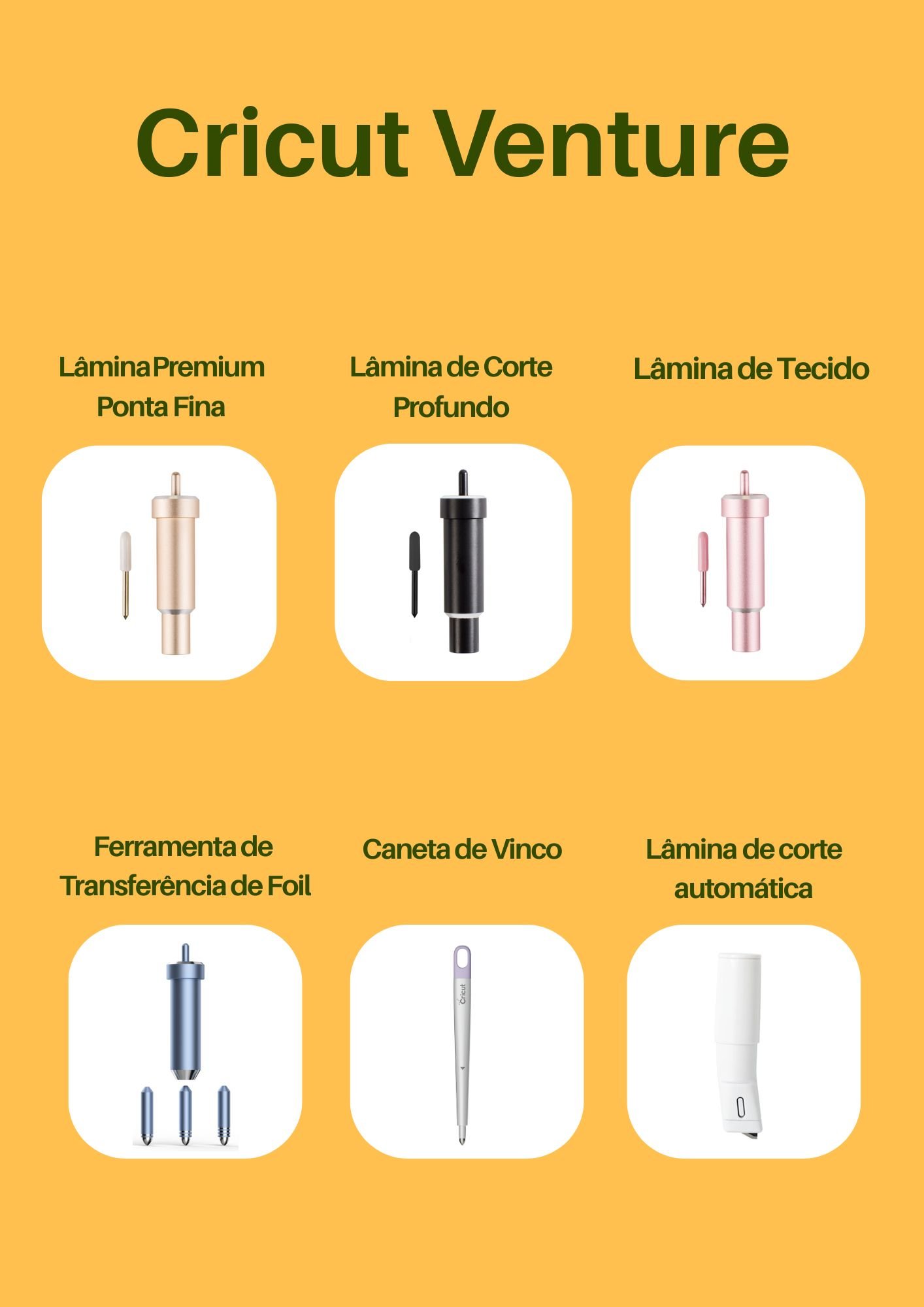
Cricut Venture Blades and Tips: A Comprehensive Overview
The Cricut Venture machine is designed to handle a wide range of materials with precision and versatility, thanks to its specialized blades and tips. Each tool is engineered to cater to specific crafting needs, ensuring clean cuts, intricate designs, and professional finishes. Among the key blades and tips available for the Venture are the Premium Fine-Point Blade, Deep-Cut Blade, Fabric Blade, Foil Transfer Tool, Scoring Stylus, and Automatic Blade. These tools collectively expand the machine's capabilities, making it suitable for everything from delicate paper crafts to robust material cutting.
Premium Fine-Point Blade, Deep-Cut Blade, and Fabric Blade
The Premium Fine-Point Blade is ideal for fine and intricate cuts on materials such as paper, cardstock, and vinyl. It ensures precision and is perfect for detailed projects like custom stickers, greeting cards, and intricate designs. The Deep-Cut Blade, on the other hand, is designed for thicker materials like chipboard, leather, and dense fabrics, providing the power needed for clean and accurate cuts. For fabric projects, the Fabric Blade is a must-have, allowing for smooth and precise cuts on various types of fabric, making it perfect for sewing, quilting, and other textile crafts.
Foil Transfer Tool, Scoring Stylus, and Automatic Blade
The Foil Transfer Tool adds a touch of elegance to projects by allowing users to apply metallic foil to materials like cardstock and paper, creating stunning accents for invitations, decorations, and more. The Scoring Stylus is essential for creating crisp fold lines on paper and cardstock, ensuring professional-looking cards, boxes, and 3D projects. Lastly, the Automatic Blade adjusts its settings automatically, making it incredibly user-friendly and versatile for a wide range of materials and projects. Together, these tools make the Cricut Venture a powerhouse for crafters, enabling them to achieve professional-quality results with ease and precision.